IPTV H.265/HEVC vs H.264 2026: Bandwidth Savings Guide
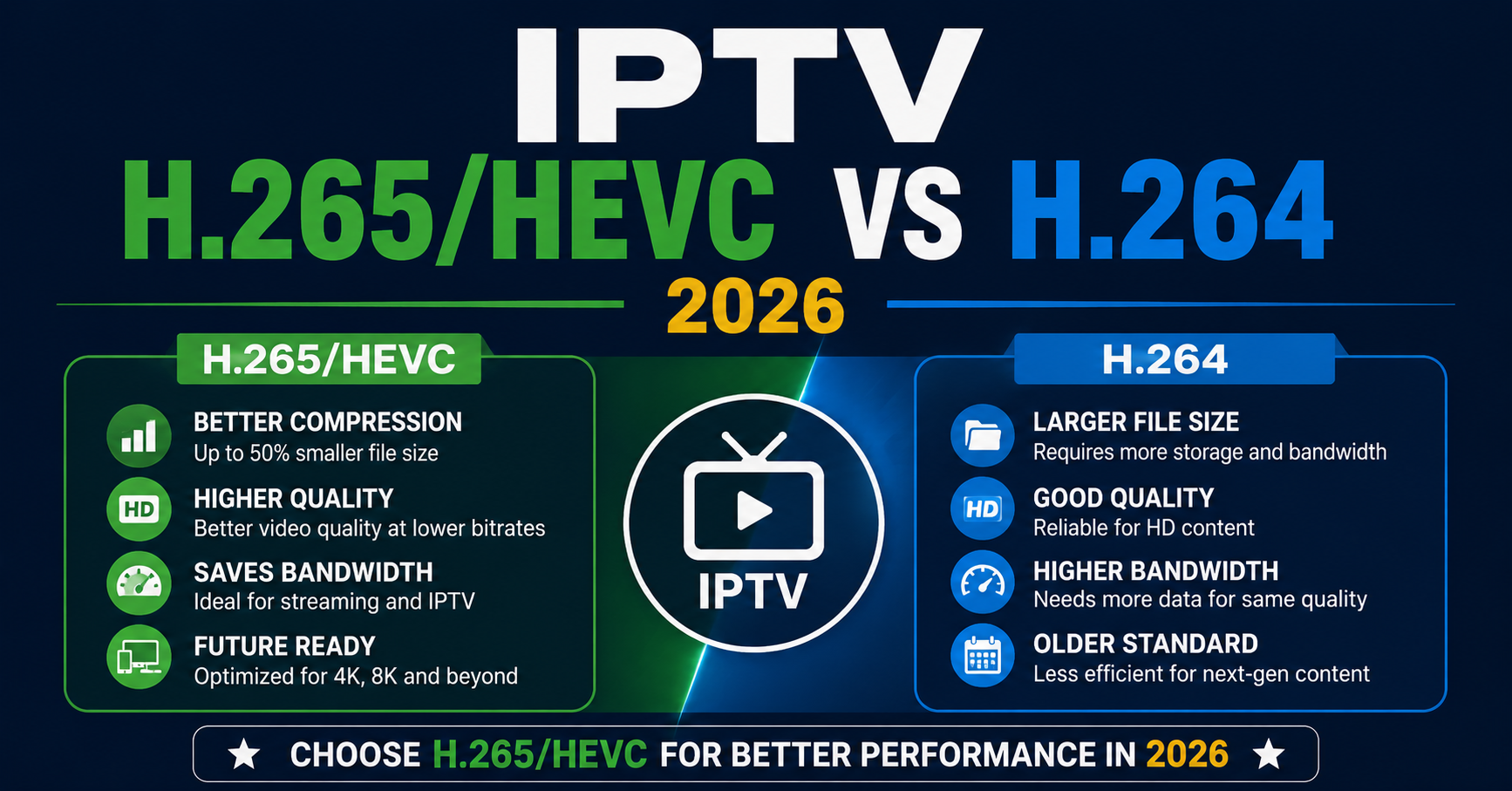
For IPTV H.265/HEVC vs H.264 2026, the short answer is this: H.265 (also called HEVC) sends the same picture quality using roughly half the bandwidth of H.264. So a stream that needs 8 Mbps in H.264 can often look identical at around 4 Mbps in H.265. That means lower data costs, fewer buffering complaints, and more headroom on your server. The catch is that H.265 demands more processing power to decode, and not every device handles it cleanly. That trade-off is the whole story, and the rest of this guide unpacks exactly what it means for you in practice.
What H.264 and H.265 Actually Are
Both H.264 and H.265 are video codecs. A codec is just a method for squashing video down so it travels over the internet without eating impossible amounts of data, then rebuilding it on the other end so your screen shows a clean picture. H.264 has been the workhorse since the mid-2000s, and almost every screen made in the last fifteen years understands it. H.265 came later, designed to do the same job more efficiently.
Think of H.264 as a reliable older car that runs everywhere, and H.265 as a newer model that sips less fuel but needs a slightly fancier engine to run. Neither is magic. They are just two different ways of solving the same compression problem, and the differences only start to matter once you are pushing streams to real customers at scale.
Why IPTV H.265/HEVC vs H.264 2026 Comes Down to Bandwidth
Bandwidth is the real reason this debate exists. Every stream you send to a subscriber consumes data, and you pay for that data somewhere along the chain, whether through your upstream provider, your server hosting, or the load your panel can handle before it strains. When you compare IPTV H.265/HEVC vs H.264 2026 on bandwidth alone, H.265 wins comfortably for most content. The savings are not theoretical.
Halving the bitrate per stream means you can either serve more concurrent customers on the same infrastructure or deliver sharper quality without raising your costs. For anyone running a busy operation during peak hours, that headroom is the difference between a smooth evening and a flood of buffering messages. If you are weighing infrastructure decisions, understanding how codec choice ripples through your whole pipeline matters as much as picking a good IPTV reseller panel in the first place.
The Real Bandwidth Numbers Side by Side
Talking percentages is fine, but actual figures make the gap clear. The numbers below are typical working ranges for delivering watchable quality, not laboratory extremes. Your real bitrates will shift depending on the content, the encoder settings, and how much motion is on screen, but the relationship between the two codecs holds steady.
| Resolution | H.264 Typical Bitrate | H.265 Typical Bitrate |
|---|---|---|
| 720p (HD) | 3 to 4 Mbps | 1.5 to 2 Mbps |
| 1080p (Full HD) | 6 to 8 Mbps | 3 to 4 Mbps |
| 4K (Ultra HD) | 20 to 25 Mbps | 10 to 12 Mbps |
The pattern is consistent across every resolution. H.265 lands at roughly half the data for a comparable picture. The higher the resolution, the bigger the absolute saving, which is why H.265 becomes almost essential the moment you start offering 4K content. At 4K, the bandwidth difference is not a nice bonus. It is what makes the stream viable at all on normal home connections.
Why IPTV H.265/HEVC vs H.264 2026 Isn’t a Clean Win
If H.265 saves so much data, why does anyone still use H.264? Because efficiency has a price, and that price is decoding power. Squeezing video harder means the receiving device has to work harder to unpack it. The whole IPTV H.265/HEVC vs H.264 2026 question turns on this hidden cost. An older streaming box, a budget smart TV, or a weak phone processor can stutter or refuse to play H.265 smoothly, even when the bandwidth is perfectly fine.
So the bottleneck simply moves. Instead of fighting a slow connection, you are now fighting an underpowered chip inside the customer’s living room. That shift is why codec choice is never purely a technical upgrade. It is a balancing act between the network and the hardware, and getting it wrong creates a support headache that has nothing to do with your stream quality.
Pro Tip
Before you push H.265 across your whole base, survey what devices your customers actually own. If a chunk of them are on older boxes or cheap smart TVs, a blanket switch to H.265 will spike your support tickets overnight, even though your streams look perfect on your own screen. Roll it out in stages and watch the complaints by device type.
Device Compatibility in IPTV H.265/HEVC vs H.264 2026
This is where many UK IPTV resellers get caught out. H.264 plays on practically anything with a screen. That universality is its quiet superpower. H.265 support is broad now in 2026 but still not total. Newer phones, current-generation streaming sticks, and recent smart TVs handle it in hardware, meaning a dedicated part of the chip does the heavy lifting efficiently. Older or cheaper hardware may fall back to software decoding, which strains the processor, drains batteries faster, and can produce the exact stuttering you were trying to avoid.
When you map out IPTV H.265/HEVC vs H.264 2026 for your own customer base, device support should weigh as heavily as the bandwidth maths. A saving that triggers playback failures on a third of your subscribers is not a saving at all. This is the same logic that makes device-aware provisioning so important, a theme covered well in guides on Smart IPTV activation and why setups fail at the customer’s end.
How Codec Choice Shapes Your Server Load
Bandwidth savings do not only help the customer. They help you, the operator, just as much. Every stream you serve pulls from your total available capacity. When IPTV H.265/HEVC vs H.264 2026 tilts toward H.265, you effectively double the number of concurrent streams your infrastructure can carry before it chokes. Picture a server comfortably handling a hundred simultaneous H.264 streams.
Switch those to H.265 and, bandwidth-wise, that same server could carry close to two hundred. During peak windows, when everyone logs on at once, that breathing room is enormous. It is the gap between a stable evening and a cascade of dropped connections. Capacity planning around codec efficiency is one of the smarter moves an operator can make, and it sits right alongside choosing infrastructure that publishes honest uptime data rather than vague promises.
Picture Quality at the Same Bitrate
Flip the comparison around and the story gets even more interesting. Instead of using H.265 to cut bandwidth, you can hold the bandwidth steady and pocket the gain as better quality. Feed both codecs the same bitrate and H.265 produces a noticeably cleaner image, with fewer of the blocky artefacts that appear during fast motion or in dark, detailed scenes. So you have two ways to spend the efficiency.
Either lower the data and keep quality flat, or keep the data and lift the quality. Many operators choose a middle path, trimming bandwidth modestly while still handing customers a visibly sharper picture. That flexibility is exactly why H.265 has become the preferred choice for premium tiers where image quality is the selling point.
The Honest Grey Area Worth Naming
It is worth being straight about something. Codec efficiency makes streaming cheaper and smoother across the board, and that includes operations of every kind, licensed and otherwise. The technology itself is completely neutral. H.265 does not know or care what content it is compressing. What matters is the legal footing of the service running on top of it.
Delivering television over the internet is a legitimate, widely used method, and plenty of fully licensed platforms rely on exactly these codecs. As an operator, the sensible posture is to understand your obligations under local broadcasting rules and run your business responsibly. The codec is a tool. How you use it, and what you have the rights to distribute, is the part that actually carries weight. Glossing over that distinction helps nobody.
When H.264 Is Still the Smarter Pick
Despite everything in H.265’s favour, there are real situations where H.264 remains the better call in 2026. If your customer base skews toward older hardware, H.264’s universal playback is worth more than any bandwidth saving. If your streams are mostly standard definition or basic HD, the efficiency gap shrinks and the compatibility advantage of H.264 starts to dominate.
There is also encoding cost to consider, since compressing into H.265 takes more processing power on your side too, which can matter if you run your own encoding pipeline. The honest takeaway from the whole IPTV H.265/HEVC vs H.264 2026 comparison is that there is no single winner for everyone. The right codec depends on your specific mix of customers, content, and infrastructure. Anyone advising you to switch everything blindly is skipping the part where you actually look at who you serve.
Conclusion
When you boil down IPTV H.265/HEVC vs H.264 2026, it comes back to one clean trade-off. H.265 gives you roughly half the bandwidth for the same quality, or much better quality for the same bandwidth, but it asks for more decoding power and does not run flawlessly on every older device. H.264 gives up that efficiency in exchange for playing on virtually anything.
The smart move is not to crown a universal winner but to match the codec to your reality: your customers’ devices, the resolution you deliver, and the capacity of your infrastructure. Get that match right and the bandwidth savings translate into lower costs, happier subscribers, and a steadier operation. Treat IPTV H.265/HEVC vs H.264 2026 as a decision shaped by your own setup, not a rule handed down from a spec sheet, and you will make the call that genuinely fits your business.
Quick Checklists by Audience
For the Subscriber
Check whether your device supports H.265 in hardware before expecting smooth high-quality streams. Use a wired connection or strong wifi for 4K content even on H.265, since lower bandwidth still needs stability. If a stream stutters but your internet speed tests fine, suspect your device’s decoding power rather than the service. Keep your streaming app and device firmware updated, as codec support improves with updates. Ask your provider which codec a given stream uses if quality seems off on one device but fine on another.
For the Reseller
Survey your customer base by device type before any codec rollout, so you know who can handle H.265. Roll out H.265 in stages and track support tickets by device to catch compatibility problems early. Use codec efficiency to plan server capacity, not just to cut visible costs. Keep H.264 streams available as a fallback for customers on older hardware. Partner with infrastructure that handles load and failover well, since efficient codecs only help if the best UK sports IPTV style peak loads are actually carried cleanly. Document which codec each package uses so support agents can troubleshoot device-versus-stream issues fast.
For the Sub-Reseller
Understand the codec basics yourself before you sell, so you can answer the obvious customer questions without escalating every time. Set expectations honestly about device requirements for H.265, especially for 4K tiers. Pass device-compatibility guidance to your own customers at signup rather than after the first complaint. Lean on your upstream provider’s troubleshooting resources instead of inventing answers, and route hardware-specific stutter problems toward a device check first. Review the codec mix of the packages you resell whenever your provider updates them, so your sales pitch stays accurate.