I watched a reseller lose his entire subscriber base
over a bank holiday weekend. Not his upstream panel, not ISP blocking, but a cheap encoder box he’d purchased six months earlier and never properly stress-tested. He was running a local live feed through it: a private event stream, encoded on-site, pushed to 60+ subscribers via his panel. At peak concurrent load, the encoder’s CPU hit 98%, the bitrate collapsed from 8Mbps to under 2Mbps, and every subscriber saw the same unwatchable pixelated mess for 40 uninterrupted minutes.
IPTV Encoder Box is the least-discussed piece of hardware in the UK IPTV reseller conversation, and that silence is costing operators real money. In 2026, as 4K HEVC streams become the subscriber expectation baseline and FTTP penetration pushes UK household connections past 80Mbps average download, the encoding layer has become a genuine operational chokepoint. Understanding what an IPTV encoder box actually does inside your infrastructure stack, and what separates a competent unit from a liability, is no longer optional knowledge for serious resellers.
This guide covers hardware selection, stream configuration, panel integration, and the encoding settings that keep your operation stable on the nights it actually matters.
Where the Encoder Sits in Your Setup
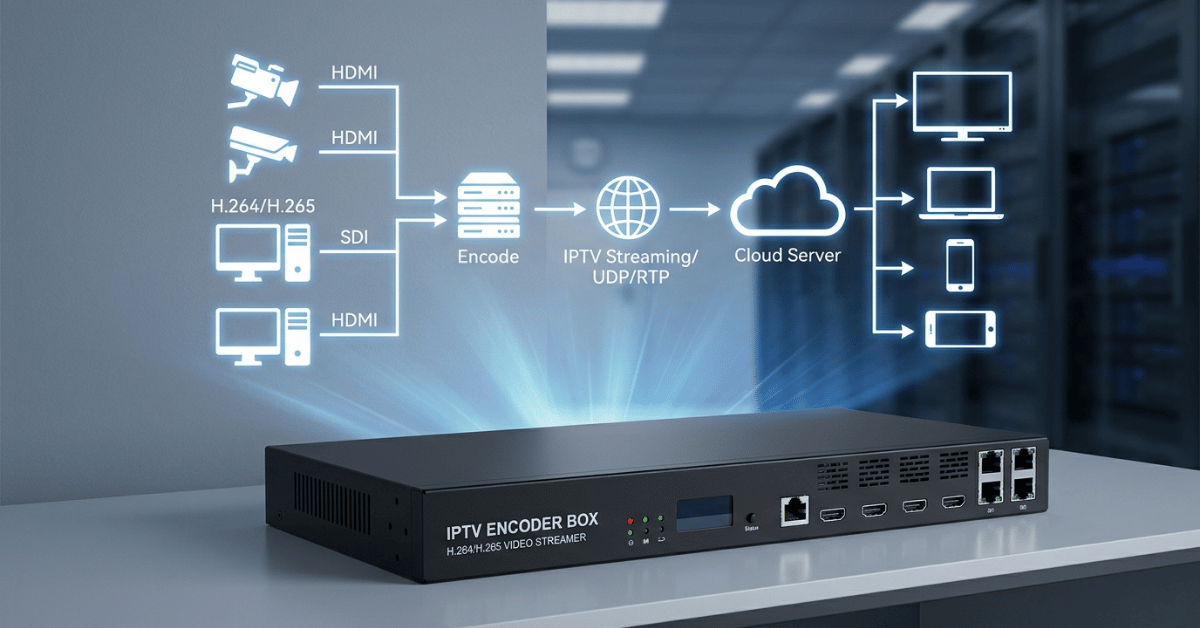
Most resellers interact with IPTV infrastructure purely at the panel and delivery layer. They buy credits, create lines, and push M3U or Xtream credentials to subscribers. The IPTV encoder box sits upstream of all of that, at the point where a raw video source gets converted into a streamable format your panel can distribute.
In practical terms:
if you’re ever working with a local signal source, whether that’s a satellite feed, a capture card input, a direct broadcast receiver, or any analogue/HDMI source, that signal needs to be encoded into an IP-compatible format before your panel can touch it. The encoder box handles that conversion, typically outputting an RTMP, HLS, or UDP stream that feeds directly into your panel’s ingest point.
The codec selection at this stage determines everything downstream.
H.264 remains the compatibility baseline. Every device, every app, every panel accepts it without issue. H.265 (HEVC) delivers roughly 40% better compression at equivalent quality, which matters enormously for 4K streams where an uncompressed H.264 feed demands 25–40Mbps per subscriber connection. An IPTV encoder box capable of real-time HEVC encoding at 4K resolution is a fundamentally different, and significantly pricier, piece of hardware than an entry-level H.264 box.
Pro Tip: Never assume an encoder box’s advertised “4K support” means real-time 4K HEVC encoding. Many budget units support 4K input passthrough but encode output at 1080p maximum. Always verify the output encoding spec, not the input resolution, before you buy.
The Only Three Specs Worth Checking
The specification sheet on an IPTV encoder box will list a dozen metrics. In 2026’s UK reseller context, three of them actually determine whether the unit performs under operational load or fails at the worst possible moment.
The three specifications that matter:
- Encoding channels: Single-channel encoders handle one source input. Multi-channel units handle simultaneous streams from multiple sources. If you’re running more than one local feed, a single-channel encoder creates an immediate bottleneck, because you cannot split one encoder across two concurrent streams without quality degradation
- Bitrate ceiling under sustained load: Advertised maximum bitrate is a peak figure, not a sustained operational figure. An encoder rated at 20Mbps maximum may stabilise at 14–15Mbps under sustained 4K HEVC load. Test this before deployment with a 90-minute continuous encode session
- Network output interface: Gigabit Ethernet output is the minimum viable standard in 2026. Any IPTV encoder box with a 100Mbps output interface is architecturally incompatible with multi-subscriber 4K delivery — the interface itself becomes the bottleneck before the encoder’s CPU does
The panel you’re feeding imposes constraints too. Smart IPTV infrastructure supports high-bitrate RTMP ingest from encoder boxes, which means the encoding quality you invest in at the hardware layer actually reaches subscribers without being throttled at the panel ingest point.
Getting the Encoding Settings Right for UK Homes
Getting the IPTV encoder box into your stack is step one. Configuring it correctly for UK residential delivery conditions is where most operators make costly mistakes that only surface under live load.
Required Uplink (Mbps)=Bitrate per Stream (Mbps)×Concurrent Subscribers×1.15\text{Required Uplink (Mbps)} = \text{Bitrate per Stream (Mbps)} \times \text{Concurrent Subscribers} \times 1.15
The 1.15 multiplier accounts for protocol overhead, re-transmission requests, and the HLS segment request traffic that runs parallel to the stream itself. A 6Mbps HEVC stream to 50 concurrent subscribers requires a minimum 345Mbps clean uplink, not 300Mbps. Under-provisioning this calculation is the single most common cause of peak-time degradation on otherwise well-configured encoder setups.
Recommended encoding parameters for UK 2026 delivery:
- Codec: H.265/HEVC for 4K delivery; H.264 for 1080p compatibility-first deployments
- Keyframe interval: 2 seconds (critical for HLS segment alignment, mismatched keyframe intervals cause the “green flash” artefact most UK IPTV resellers misdiagnose as a network issue)
- Output protocol: RTMP for panel ingest; HLS for direct subscriber delivery where panel intermediary is bypassed
- Audio: AAC at 192kbps minimum. The encoding layer where budget boxes cut corners most aggressively
- GOP structure: Closed GOP only, open GOP structures create seek errors in GSE Smart IPTV and STBEmu that generate disproportionate support tickets
Budget Box vs Professional Unit, Side by Side
| Specification | Budget Encoder Box (£80–£200) | Professional Unit (£400–£1,200) |
|---|---|---|
| Max Encoding Codec | H.264 only | H.264 + H.265/HEVC |
| 4K Real-Time Encoding | No (passthrough only) | Yes (hardware-accelerated) |
| Sustained Bitrate Stability | Degrades under load | Consistent under sustained encode |
| Encoding Channels | Single | 2–4 simultaneous channels |
| Network Output | 100Mbps (bottleneck risk) | Gigabit Ethernet standard |
| Keyframe Configuration | Fixed / limited | Fully configurable |
| RTMP Output Support | Basic / unstable | Stable multi-destination RTMP |
| Operational Lifespan | 12–18 months under load | 3–5 years with proper thermals |
The price difference between a budget and professional IPTV encoder box is typically £300–£800. Across a 50-subscriber operation charging £50/month per line, that investment recovers in under two months of reduced churn and eliminated event-night support crises.
The Overheating Problem Nobody Warns You About
Real-time HEVC encoding generates sustained CPU and GPU load that pushes hardware temperatures to operational limits. The failure mode isn’t dramatic. There’s no crash, no error message. The encoder simply begins dropping frames silently when thermal throttling kicks in, typically at 85–90°C on budget hardware. Subscribers see intermittent micro-freezes that look identical to network buffering.
I’ve diagnosed three separate “buffering complaints” that turned out to be encoder thermal throttling. The tell is consistent:
the issue appears 25 to 40 minutes into a sustained stream, never at the start, and clears briefly if you restart it, because the restart gives the hardware 30 to 60 seconds to cool fractionally before throttling resumes.
Pro Tip: Mount your IPTV encoder box vertically if the chassis allows it, with at least 10cm clearance on all sides. Log CPU temperature during a 60-minute test encode before any live deployment. If temperature exceeds 80°C under test conditions, add active cooling before your first live event, not after.
Connecting the Encoder to Your Panel
The final operational layer is getting your encoder’s output stream reliably into your reseller panel’s ingest system. This is where the infrastructure choice upstream determines your delivery quality downstream. An IPTV encoder box outputting a clean 8Mbps HEVC RTMP stream fed into a panel running on under-provisioned offshore servers will still buffer. The encoding quality becomes irrelevant if the panel can’t redistribute it at speed.
The panel ingest architecture needs to match the encoder output specification:
- RTMP ingest endpoint with sufficient bandwidth allocation for your peak subscriber count
- Panel server located on UK 10Gbps+ infrastructure to prevent latency accumulation between ingest and delivery
- Load balancing at the panel level to prevent single-node overload when concurrent subscriber sessions spike during live events
Smart IPTV provides the UK-node panel infrastructure that handles high-bitrate RTMP ingest without the throttling that kills the quality investment you’ve made at the encoder hardware layer. The encoder and the panel are one system. Optimise one while neglecting the other produces the same subscriber experience as running budget hardware throughout.
Your 2026 Setup Checklist
Verify output encoding specs — confirm real-time HEVC encoding capability, not just 4K input passthrough, before purchasing any encoder box
Run the uplink calculation — apply the 1.15 overhead multiplier to your bitrate-per-subscriber figure; never provision to the theoretical maximum
Configure keyframe intervals correctly — 2-second closed GOP structure eliminates the majority of seek errors and green-flash artefacts across all major IPTV players
Thermal test before every live deployment — 60-minute sustained encode at target bitrate, temperature must stay below 80°C; add active cooling if it doesn’t
Match encoder output to panel infrastructure — use Smart IPTV as your panel backbone to ensure UK 10Gbps+ ingest capacity matches the quality your encoder hardware is capable of delivering
The IPTV encoder box is the silent variable in most UK reseller operations, invisible when it works and catastrophic when it doesn’t. Get the hardware right, configure the parameters correctly, and integrate it into infrastructure that can handle what it produces. Everything else follows from that foundation.