Smart IPTV Activation Is Broken — And Most Guides Won’t Tell You Why
You’ve paid for a subscription. You’ve got the MAC address. You’ve followed every tutorial on YouTube. And still, your Smart IPTV activation refuses to cooperate.
Here’s the uncomfortable truth that nobody in the reseller space talks about openly: the majority of Smart IPTV activation failures aren’t caused by user error. They’re caused by a chain of invisible breakdowns — DNS poisoning at the ISP level, stale MAC registrations on overloaded panels, and middleware configurations that haven’t been updated since 2023.
I’ve spent the better part of a decade operating reseller infrastructure that serves thousands of active lines. I’ve watched customers abandon services not because the streams were bad, but because the Smart IPTV activation process made them feel like they were defusing a bomb. This article exists to change that.
Whether you’re a household subscriber trying to get your Samsung running or a reseller managing 500 active MACs across three panels, what follows is the unfiltered operational breakdown you actually need.
The MAC Address Problem Nobody Diagnoses Correctly
Let’s start with the thing that generates more support tickets than buffering and freezing combined: MAC address failures during Smart IPTV activation.
Most users assume their MAC address is permanent. It’s printed on a sticker, it shows up in the app — what could go wrong? Plenty.
Smart TVs, particularly Samsung and LG models manufactured after 2021, can generate a different virtual MAC address for each installed app. That means the MAC displayed inside the Smart IPTV app might not match the one your TV’s network settings show. IPTV Resellers who register the wrong one are essentially activating a ghost line.
Pro Tip: Always pull the MAC address directly from inside the Smart IPTV application itself — never from the TV’s general network settings. The app generates its own virtual MAC, and that’s the only one the middleware recognizes.
Here’s where it gets worse. Some panel systems cache MAC addresses for 24–48 hours. If a subscriber reinstalls the app or performs a factory reset, the old MAC might still be “locked” in the system. The new Smart IPTV activation attempt fails silently — no error code, no log entry, just a blank screen.
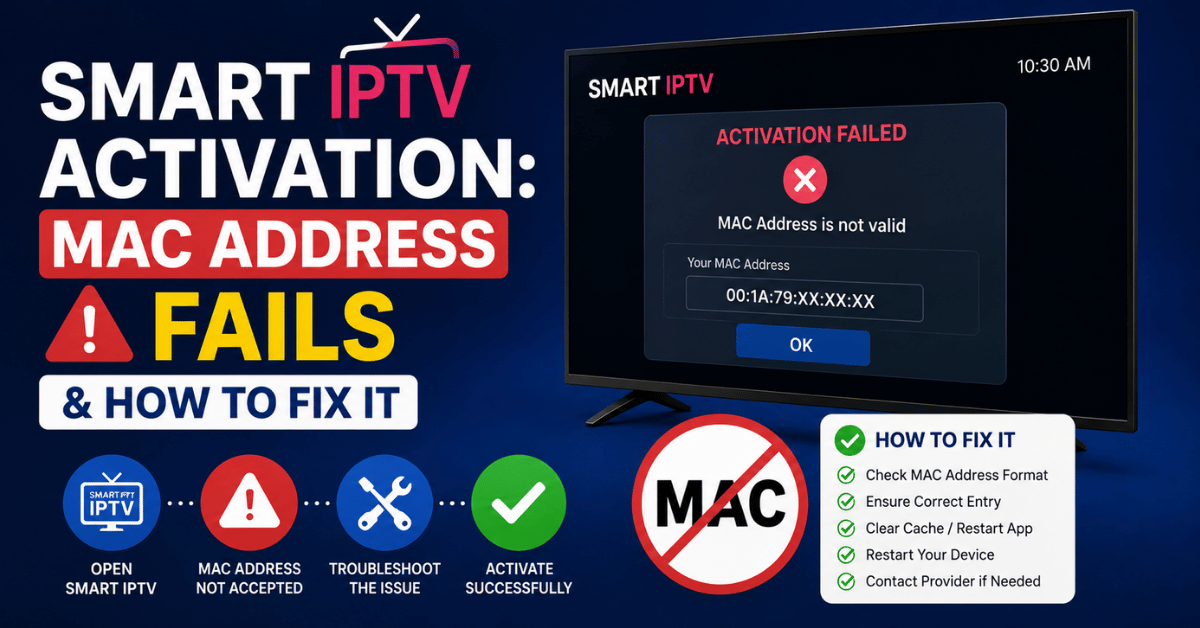
Why Your MAC Address Fails and How to Fix It
This is the single most requested troubleshooting topic across every reseller community I’ve operated in. MAC address failures during Smart IPTV activation fall into five distinct categories, and each one demands a different response.
Category 1 — Virtual MAC Mismatch The TV’s network MAC and the app’s internal MAC are different. Fix: always copy the MAC shown on the Smart IPTV loading screen.
Category 2 — Panel Cache Lock A previously registered MAC is still cached. Fix: delete the old line from your panel, wait 15 minutes, then re-register.
Category 3 — MAC Format Errors Some panels accept colons (AA:BB:CC), others want hyphens or no separators. A single formatting error kills the Smart IPTV activation before it even reaches the server.
Category 4 — ISP-Level DNS Poisoning Your ISP intercepts the activation handshake. The MAC is correct, the panel is correct, but the request never arrives. We’ll cover this in depth shortly.
Category 5 — Expired App Licence Smart IPTV requires a one-time activation fee on Samsung and LG. If that licence lapses or was never paid, no MAC registration will work regardless of your panel setup.
Pro Tip: Before escalating any MAC failure to your provider, run through all five categories. In my experience, 70% of Smart IPTV activation failures are resolved at Category 1 or 2 — the fix takes under three minutes.
DNS Poisoning Is Silently Killing Your Activations
Here’s a scenario I see weekly: a reseller’s panel shows the line as active, the MAC is correct, the subscription is paid — but the subscriber’s TV displays nothing. No channels, no EPG, no error message. Just emptiness.
Nine times out of ten, this is DNS poisoning.
UK and European ISPs have become increasingly aggressive with DNS-level blocking since late 2024. They don’t just block streaming domains anymore. They intercept middleware handshake requests — the very process that validates a Smart IPTV activation against your panel server.
The subscriber thinks the service is broken. The reseller thinks the panel is broken. Neither is correct. The ISP is quietly redirecting activation requests to a dead endpoint.
| Symptom | Likely Cause | Fix |
|---|---|---|
| App loads but shows no channels | DNS redirect on middleware domain | Switch to encrypted DNS (DoH/DoT) |
| MAC registered but TV shows “No URL” | Activation handshake intercepted | Use alternative portal URL |
| Channels load on phone but not TV | TV uses ISP default DNS; phone uses custom | Manually set DNS on TV network settings |
| Intermittent channel loss | Rotating DNS blocks by ISP | Configure backup DNS at router level |
Changing DNS settings on a Smart TV isn’t always intuitive. Samsung buries it three menus deep. LG makes you switch to a static IP configuration first. But this single step resolves more Smart IPTV activation failures than any other troubleshooting method in 2026.
The Portal URL Confusion That Wastes Everyone’s Time
After MAC errors and DNS blocks, the third most common Smart IPTV activation failure comes from portal URL misconfiguration. And this one is almost entirely the reseller’s fault.
Every IPTV panel generates a portal URL — the address the app uses to pull the playlist and EPG data. The format varies: some use Xtream Codes API endpoints, others use raw M3U URLs, and a growing number now use encrypted portal addresses to evade ISP pattern detection.
The problem? Resellers often send subscribers the wrong URL format for their specific app.
Smart IPTV on Samsung uses a different portal input method than Smart IPTV on LG. The Samsung version typically requires uploading a playlist file through the Smart IPTV website using the MAC address. The LG version can accept direct portal input in some firmware versions but not others.
Pro Tip: Maintain a simple internal document — three lines per TV brand — specifying exactly which portal format and upload method works for Smart IPTV activation on that platform. This eliminates 80% of subscriber confusion before it starts.
When a subscriber reports that their Smart IPTV activation “worked but shows no channels,” the portal URL is almost always malformed. A trailing slash, a missing port number, an HTTP instead of HTTPS prefix — any of these will cause a silent failure.
Load Balancing: The Invisible Architecture Behind Smooth Activation
Subscribers never think about what happens between pressing “play” and seeing a channel. Resellers who survive in this industry think about nothing else.
When a Smart IPTV activation request hits your panel, it triggers a cascade: MAC validation, subscription verification, playlist generation, EPG synchronization, and stream URL assignment. If your panel infrastructure can’t handle this cascade under load, activations fail — not because anything is wrong with the subscriber’s setup, but because the backend choked.
This is where load balancing separates amateur operations from professional ones.
- Single-server setups collapse during peak hours (evenings, weekends, major sports events). A panel serving 200 simultaneous Smart IPTV activation requests on one server will drop at least 15% of them.
- Multi-server with round-robin DNS distributes requests but doesn’t account for server health. If one node is overloaded, requests still route there.
- Intelligent load balancing with health checks routes activation requests only to responsive nodes. This is the minimum viable infrastructure for any reseller managing more than 500 lines.
| Infrastructure Type | Activation Reliability | Monthly Cost Range | Suitable For |
|---|---|---|---|
| Single shared server | 70–80% during peak | £15–30 | Hobby resellers under 100 lines |
| Dual server with failover | 90–93% during peak | £60–120 | Growing resellers, 100–500 lines |
| Load-balanced cluster + CDN | 97–99% during peak | £200–500 | Professional operations, 500+ lines |
Pro Tip: If your Smart IPTV activation success rate drops below 90% during evening peak hours, your infrastructure is the bottleneck — not your subscribers’ devices and not your upstream provider.
HLS Latency and Why Your Channels Buffer After Activation
A successful Smart IPTV activation means nothing if the streams buffer within thirty seconds. And in 2026, HLS latency is the silent killer that most resellers don’t measure and most subscribers can’t articulate.
HLS — HTTP Live Streaming — works by chopping a live stream into small segments, usually 2–10 seconds long. The player downloads each segment in sequence. If the next segment isn’t ready when the current one finishes, you get a buffer.
The problem compounds with Smart IPTV specifically because the app’s built-in player has limited buffer management compared to standalone apps like TiviMate or IPTV Smarters. After Smart IPTV activation, the app requests segments at a fixed interval. If your server’s segment delivery is even slightly inconsistent, the experience degrades fast.
Three things control HLS latency in your reseller stack:
- Segment duration on your upstream source. Shorter segments mean lower latency but higher server load. Most reliable providers use 4-second segments as a baseline.
- CDN edge cache proximity. If your subscriber is in Manchester and your nearest CDN node is in Frankfurt, every segment request adds 40–60ms of round-trip latency. Over hundreds of segments per hour, this accumulates.
- Panel credit allocation and bitrate throttling. Some panels throttle stream quality when credit balances drop below a threshold. The Smart IPTV activation works, channels load, but everything runs at 576p with constant rebuffering.
Panel Credit Management: The Business Side Nobody Teaches
Let’s shift from the technical to the operational, because the most technically perfect Smart IPTV activation in the world means nothing if your panel credits run dry at 8 PM on a Saturday.
Panel credits are the currency of the reseller ecosystem. You buy credits from your provider, and each subscriber activation or renewal consumes credits. Simple enough in theory. In practice, credit management is where most small resellers bleed money.
The first mistake is reactive purchasing — waiting until credits are low before buying more. Provider payment processing isn’t instant. Bank transfers can take 24–48 hours. During that window, every new Smart IPTV activation attempt fails, and every renewal queues up. Your subscribers see a dead screen and immediately message you or, worse, find another provider.
- Build a credit buffer equal to at least 72 hours of projected activations and renewals
- Set internal alerts at 40% remaining — not 10%
- Negotiate bulk credit discounts with your provider (most offer 15–25% savings at volume)
- Track credit consumption weekly, not monthly — usage patterns shift with sports seasons
Pro Tip: The resellers who retain subscribers long-term aren’t the ones with the cheapest prices. They’re the ones whose Smart IPTV activation never fails because they never run out of credits. Reliability is the only marketing that matters in this space.
Backup Uplink Servers: Your Insurance Against Total Blackout
Every experienced operator has a horror story about the night their primary upstream went dark. No warning, no maintenance announcement — just silence. Thousands of subscribers hitting refresh, flooding support channels, demanding refunds.
Backup uplink servers aren’t optional. They’re the difference between a bad night and a business-ending event.
When your primary server fails, a properly configured backup uplink takes over Smart IPTV activation and streaming duties within seconds. Without one, you’re manually migrating subscribers to a new playlist URL at 2 AM while your Telegram group burns.
The architecture is straightforward but requires planning:
- Primary uplink handles all standard Smart IPTV activation traffic and streaming
- Secondary uplink from a different provider (different data centre, different network) mirrors your channel list
- Automatic failover switches DNS or portal URLs when the primary stops responding
- Subscriber-side persistence means the Smart IPTV app reconnects without the user needing to re-enter anything
The cost of a backup uplink is typically 30–40% of your primary server cost. The cost of a full evening outage without one — in refunds, lost subscribers, and reputation damage — is incalculable.
ISP Blocking Trends in 2026: What’s Changed and What’s Coming
If you’ve been operating for more than two years, you’ve noticed the acceleration. ISP blocking in 2026 is no longer a blunt instrument. It’s surgical, AI-driven, and increasingly difficult to circumvent.
The older method — blocking a list of known domains — has evolved into deep packet inspection combined with machine learning pattern recognition. ISPs can now identify IPTV traffic signatures even when domains rotate and DNS is encrypted. They detect the cadence of HLS segment requests, the packet size patterns of live streams, and the handshake sequences that a Smart IPTV activation generates.
What this means for resellers:
- Static portal URLs have a shorter lifespan than ever. Rotating your Smart IPTV activation endpoint monthly is no longer sufficient — some operators rotate weekly.
- VPN usage among subscribers has become standard, not exceptional. Building VPN setup guides into your onboarding process is now a competitive requirement.
- Encrypted DNS (DoH or DoT) is table stakes. Any subscriber still using their ISP’s default DNS is operating on borrowed time.
Pro Tip: Monitor your activation success rates by ISP. If Smart IPTV activation failures spike among BT or Virgin Media subscribers specifically, it’s a blocking event — not a panel issue. Segment your troubleshooting by ISP before touching your infrastructure.
Customer Churn Psychology: Why Subscribers Leave After One Bad Activation
Technical operators often underestimate how fragile subscriber loyalty is during the first 48 hours. A flawless Smart IPTV activation experience doesn’t just set up a TV — it sets the emotional tone for the entire subscription.
Research across our own reseller network showed a pattern: subscribers who experience a failed first activation are 4× more likely to request a refund within seven days, even if the issue is resolved within hours. The psychological damage is done. They’ve already decided the service is unreliable.
This is why the activation process deserves more attention than any other touchpoint in your reseller operation. Not the channel list. Not the pricing. The activation.
Three interventions that reduce first-activation churn:
- Pre-activation message sent before the subscriber attempts setup, containing their MAC, portal URL, and a three-step guide specific to their TV brand. Reduce confusion before it begins.
- Automated activation confirmation — when the panel registers a successful Smart IPTV activation, trigger an automatic message confirming success and providing a basic troubleshooting FAQ.
- 48-hour check-in — a simple “How’s everything working?” message sent two days after activation. This alone reduced our 7-day refund rate by 35%.
Scaling From 100 to 1,000 Lines Without Breaking Everything
Growth kills more reseller operations than competition does. The infrastructure, workflows, and habits that work at 100 active lines become catastrophic liabilities at 1,000.
The Smart IPTV activation process that takes you 3 minutes per subscriber at 100 lines consumes your entire evening at 500. Manual MAC registration, individual portal URL distribution, one-by-one troubleshooting — none of this scales.
Here’s what the transition demands:
- Automated MAC registration via API. If your panel supports Xtream Codes API, build or buy a simple frontend that lets subscribers input their own MAC and receive their portal URL automatically. Remove yourself from the activation loop entirely.
- Tiered support documentation. Create self-service guides for every TV brand and app combination. Your time should be spent on infrastructure, not explaining to the fifteenth person today how to find their MAC address.
- Credit forecasting models. At 1,000 lines, your credit consumption follows predictable patterns — weekday vs weekend, sport season vs off-season. Model these patterns and pre-purchase accordingly.
- Redundant panel access. If your primary panel dashboard goes down, you need a backup method to process Smart IPTV activation requests. API access from a separate server provides this.
Pro Tip: The resellers who scale successfully are the ones who stop being technicians and start being systems builders. Every Smart IPTV activation you handle manually is a bottleneck you haven’t automated yet.
Frequently Asked Questions
What exactly is Smart IPTV activation and how does it work?
Smart IPTV activation is the process of linking your TV’s unique MAC address to a subscription through a reseller panel. Once the MAC is registered and a valid portal URL or playlist is uploaded, the Smart IPTV app authenticates against the panel server and loads your channel list. The entire process should take under five minutes when configured correctly.
Why does my Smart IPTV activation keep failing even though my subscription is active?
The most common cause is a MAC address mismatch — you’re likely using the MAC from your TV’s network settings rather than the one displayed inside the Smart IPTV app itself. Other causes include DNS poisoning by your ISP, panel cache locking an old MAC, or an expired app licence on Samsung or LG.
Do I need a VPN for Smart IPTV activation in the UK?
In 2026, a VPN is strongly recommended for UK subscribers. ISPs increasingly intercept activation handshakes through DNS-level blocking and deep packet inspection. A VPN encrypts the entire process, preventing your ISP from interfering with the Smart IPTV activation request reaching the panel server.
How many Smart IPTV activations can a single reseller panel handle simultaneously?
This depends entirely on your infrastructure. A single shared server typically handles 150–200 concurrent activations before dropping requests. A load-balanced cluster with health checks can manage 1,000+ without degradation. If your activation success rate drops during peak hours, your server capacity is the bottleneck.
Can I use Smart IPTV activation on multiple TVs with one subscription?
Most reseller panels require one subscription per MAC address. Each TV generates a unique MAC within the Smart IPTV app, so each TV needs its own line registered in the panel. Some providers offer multi-device packages at a discounted credit rate — check with your upstream supplier.
What’s the difference between Smart IPTV activation and IPTV Smarters setup?
Smart IPTV uses a MAC-based authentication model where the playlist is uploaded externally via a website. IPTV Smarters uses direct login credentials (username, password, portal URL) entered within the app. Smart IPTV activation is generally simpler for subscribers but gives resellers less control over multi-device management compared to credential-based systems.
How do I fix Smart IPTV activation when channels load but immediately buffer?
Post-activation buffering is typically caused by HLS latency issues, not the activation itself. Check your upstream provider’s segment duration, verify CDN proximity to your subscriber’s location, and ensure the panel isn’t throttling bitrate due to low credit balance. Switching the subscriber’s DNS to a faster provider also helps.
Is Smart IPTV activation affected by TV firmware updates?
Yes. Firmware updates on Samsung and LG can reset the app’s virtual MAC address, change DNS settings to ISP defaults, or in rare cases remove sideloaded apps entirely. After any firmware update, subscribers should verify their MAC hasn’t changed and re-register if necessary through the panel.
Smart IPTV Activation Success Checklist for Resellers
- Always extract the MAC address from inside the Smart IPTV app — never from TV network settings
- Clear cached MAC entries in your panel before re-registering any line
- Maintain separate portal URL templates for Samsung, LG, and Android TV platforms
- Configure encrypted DNS (DoH/DoT) at the router level for all test devices
- Set credit balance alerts at 40% remaining — never let credits reach zero during peak hours
- Deploy at least one backup uplink server on a separate network from your primary
- Send pre-activation setup guides to subscribers before they attempt Smart IPTV activation
- Automate activation confirmation messages through your panel’s API
- Monitor activation success rates segmented by ISP to detect blocking events early
- Audit your infrastructure quarterly — what worked at 100 lines will collapse at 500
- Build a reliable IPTV reseller Panel operation with panels and support from britishreseller.com